// xyphrolabs
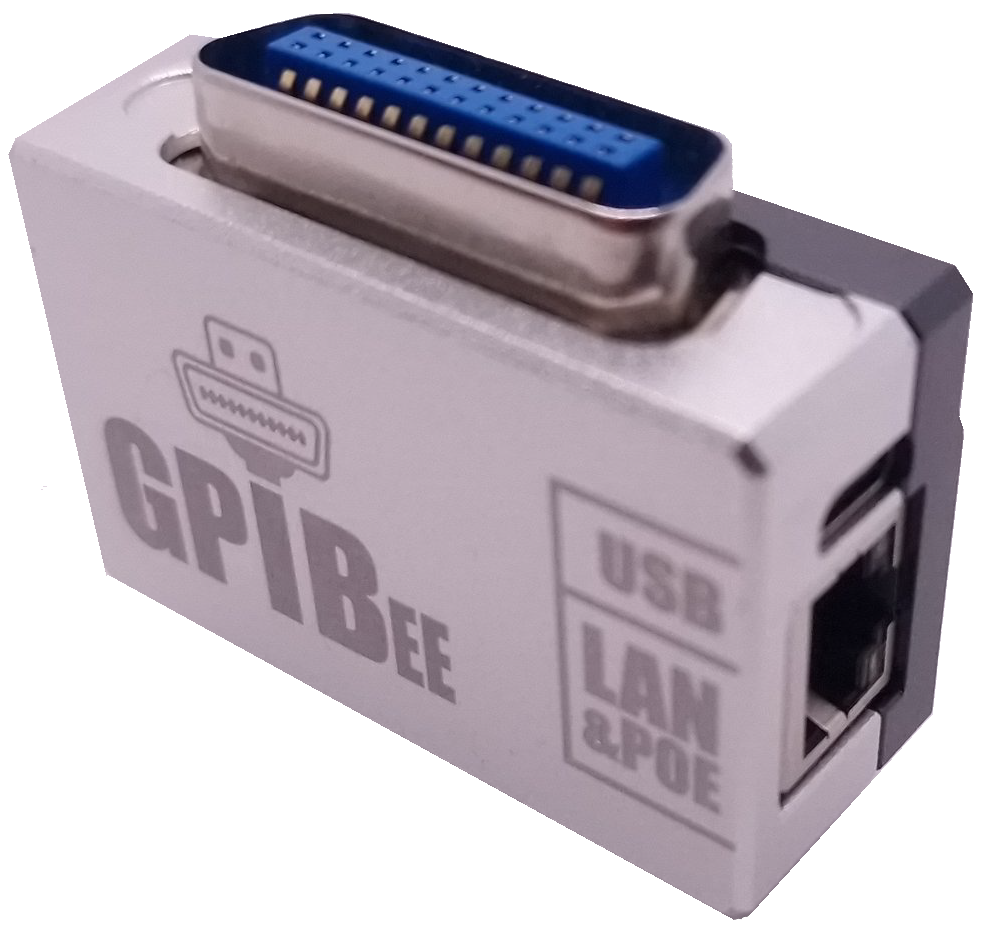
XyphroLabs GPIBee
USB-C and Ethernet to GPIB for legacy IEEE-488 instruments. Full VISA over open protocols, Power over Ethernet, and no proprietary drivers.


Official XyphroLabs product. This is the genuine GPIBee from XyphroLabs, sold and supported in North America by Binho.
// description
Product Description.
The GPIBee connects legacy IEEE-488 (GPIB / HPIB / IEC-625) instruments to modern computers over USB-C and Ethernet, using open, non-proprietary Test & Measurement protocols. It is auto-discovered by your VISA resource manager, so oscilloscopes, multimeters, power supplies, and signal generators built decades ago work the way your test software already expects.
Instead of a proprietary protocol clone, the GPIBee speaks industry-standard VXI-11, USBTMC, and a Prologix-compatible ASCII protocol, plus the native Linux GPIB interface. It works out of the box with PyVISA, MATLAB, LabVIEW, GNU Octave, NI-VISA, Keysight IO Libraries, and R&S VISA on Windows, macOS, and Linux. No proprietary drivers to install.
Built on seven years of open-source USBGPIB heritage, the GPIBee adds galvanically isolated 10/100 Ethernet with 802.3af Power over Ethernet, 480 Mbps USB 2.0 High Speed, a browser-based console, and concurrent multi-session access, so several applications or PCs can share up to 15 instruments on one bus. Designed, assembled, and tested in Germany, and supported directly by its maker.
// key features
More than a USB-to-GPIB dongle.
// connectivity
USB-C and Ethernet.
- USB-C (USB 2.0 High Speed, 480 Mbit/s)
- 10/100 Ethernet, galvanically isolated
- 802.3af Power over Ethernet, no power brick
- Automatic USB / Ethernet switching
// open protocols
Open standards, not clones.
- VXI-11 over USB and Ethernet
- USBTMC (USB Test & Measurement Class)
- Prologix-compatible ASCII protocol
- Native Linux GPIB interface
// visa integration
Full VISA, auto-discovered.
- NI-VISA, Keysight IO Libraries, R&S VISA
- PyVISA, MATLAB, LabVIEW, GNU Octave
- Auto-discovered by VISA resource managers
- Any VISA-compatible software
// multi-session
Up to 15 instruments, shared.
- Control up to 15 GPIB instruments at once
- Concurrent sessions from multiple apps or PCs
- GPIB primary addresses 0–30
- Adjustable T1 delay (350 ns – 2 µs)
// web interface
Browser console built in.
- Send GPIB commands from any browser
- Desktop and mobile status monitoring
- LXI, VXI-11, mDNS, and SSDP discovery
- USB creates a private, isolated network
// build quality
Made in Germany.
- CNC-machined, EMI-shielded aluminum housing
- Galvanic isolation protects host and instruments
- Field-updatable firmware via virtual USB drive
- Actively maintained, direct manufacturer support
// web interface
Control it from your browser.
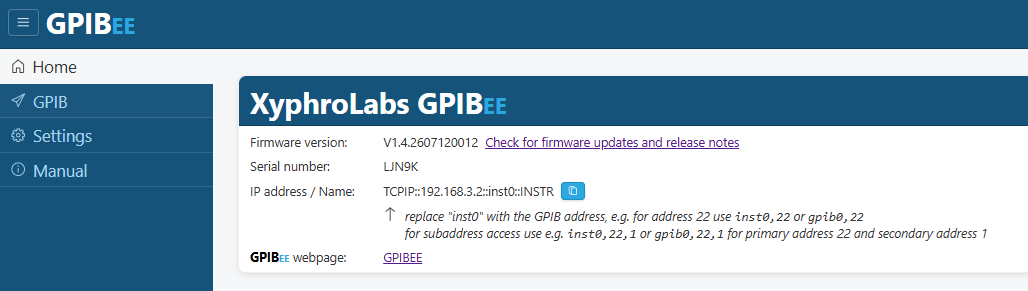
The GPIBee serves a built-in web console over USB or Ethernet. Send GPIB commands, read live status, copy the ready-to-paste VISA resource string, and check for firmware updates, all from any browser, desktop or mobile, with nothing to install.
// console
Send GPIB commands
Type commands and watch responses stream back, live.
// visa string
One click to VISA
Copy the ready-to-paste resource string straight into your tool.
// status
Status at a glance
Firmware version, serial number, and network address up front.
// firmware
Updates & settings
Check for firmware updates and configure the adapter, no app needed.
// benches
Build a custom front panel. No code.
Benches is a browser-based front-panel builder, supported on every GPIBee. Assemble buttons, readouts, and live graphs for any GPIB instrument, then drive it from a phone, tablet, or laptop, with nothing to install and nothing to script.
- No software to install, build and use it from any browser
- Retrofit a modern front panel onto 1980s-era instruments
- Live trend graphs (min / max / average) and one-click CSV export
- A separate front panel per instrument, stored on the GPIBee
- Handles non-SCPI instruments and unusual reply formats
- Portable .gpibee files to share benches with your team
// applications
Target Use-Cases.
- Legacy Instrument Modernization
- Automated Test Equipment (ATE)
- Remote & Networked Test (Ethernet / PoE)
- Laboratory Measurement Systems
- Research & Development Testing
- Production Test Benches
// specifications
Technical specifications.
- Host interfaces
- USB-C (480 Mbit/s) + isolated 10/100 Ethernet
- GPIB connector
- 24-pin IEEE-488 (HPIB, IEC-625)
- Protocols
- VXI-11, USBTMC, Prologix, Linux GPIB
- VISA
- NI, Keysight, R&S, PyVISA, MATLAB, LabVIEW
- Operating systems
- Windows, macOS, Linux
- Power
- USB 5 V or 802.3af PoE
- Instruments
- Up to 15, concurrent multi-session
- Addressing
- Primary 0–30, adjustable T1 delay
- Discovery
- LXI, VXI-11, mDNS, SSDP
- Enclosure
- CNC aluminum, EMI shielded
- Firmware
- Field-updatable via USB drive
- Made in
- Germany
// compatible instruments
Decades of instruments. Verified.
A partial list. The GPIBee works with any IEEE-488.2 compliant instrument.
Rohde & Schwarz
- FSV Spectrum Analyzer
- SMU200A Signal Generator
- ZNB Vector Network Analyzer
- RTO Oscilloscope Series
Keysight (Agilent/HP)
- E3631A Power Supply
- 34401A Multimeter
- E4428C Signal Generator
- E5071C Network Analyzer
- DSO-X Series Oscilloscopes
Tektronix
- TDS2000 Series Oscilloscopes
- AFG3000 Function Generator
- Keithley 2000 Multimeter
- Keithley 2400 SourceMeter
Other Manufacturers
- Gould Digital Oscilloscopes
- Fluke Multimeters
- And many more legacy instruments
// comparison
GPIBee vs. USBGpib V2.
Both are driverless USB-to-GPIB adapters. The GPIBee steps up with Ethernet and Power over Ethernet, VXI-11, a browser console, and concurrent access from multiple PCs.
| Feature | GPIBee | USBGpib V2 |
|---|---|---|
| USB connector | USB-C | USB-C |
| USB speed | High Speed (480 Mbit/s) | Full Speed (12 Mbit/s) |
| Ethernet port | Built-in RJ45, with PoE | — |
| Private, isolated USB network | — | |
| Works without proprietary drivers | ||
| Operating systems | Windows, macOS, Linux | Windows, macOS, Linux |
| Standard protocols | VXI-11 (USB & Ethernet), USBTMC | USBTMC |
| Prologix-compatible protocol | — | |
| Configuration interface | Web interface + SCPI | SCPI commands only |
| GPIB console via web browser | — | |
| Multiple devices, one controller | Best-in-class via VXI-11 | Possible, not easy to use |
| Concurrent access from multiple PCs | — | |
| Service Request (SRQ) | ||
| Primary address range | 0–30 | 1–30 |
| Secondary address range | 0–30 | 0–7 |
| Adjustable controller address | 0–30 | Fixed at 0 (LinuxGPIB only) |
| T1 delay time | Adjustable, 350 ns to 2 µs | Fixed |
| Auto-discovery (LXI / mDNS / SSDP) | — |
Bring your GPIB bench
onto the network.
Add the GPIBee to your test bench and control legacy instruments over USB or Ethernet, from any VISA tool.